Talk to us

Find buyers while they’re still choosing

See who is buying, what they need and who to contact. Your team reviews each draft before it goes out.
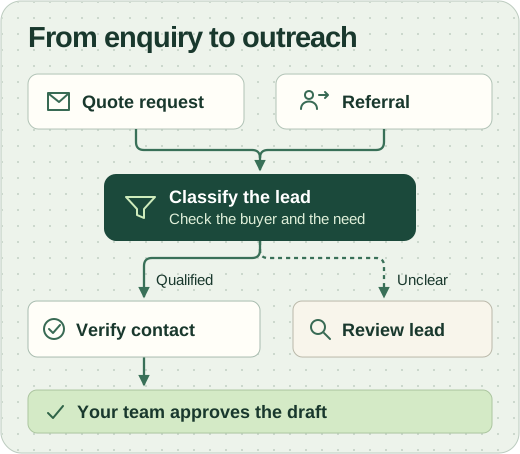
Quote requests and referrals enter lead classification. Unclear leads go to review. Qualified contacts are verified before your team approves the outreach draft.

A brochure for B2B sales teams

Below, we follow one lead from the first signal to a reply, then show how we build the platform around your market.

  • Business buyers, found by signal
  • Referral partners who send you customers
  • Your team approves every send

One platform, from signal to reply

It does the searching, checking and drafting. Your team keeps the one decision that matters: whether to send.

  • Spots buying signals

    Quote requests, partner referrals and tenders reveal what a buyer needs and when.

  • Checks the fit

    Every company is matched against who you sell to, and graded.

  • Finds the person who signs

    The role that buys, with an email checked before anyone uses it.

  • Drafts the message

    Short, in your tone, and quoting the signal so the reason is clear.

  • Sends from your inbox

    After your team approves it, and tracks the reply in the same thread.

  • Finds referral partners

    The businesses that send you customers, for your B2C side.

Works with tools you already use

  • Gmail
  • Outlook
  • HubSpot
  • Zoho
  • Google Sheets

Our internal sales dashboard

We built this sales dashboard to bring leads into one pipeline and give each opportunity a clear next step.

The sales pipeline

Filter by industry, trigger or stage to see why a company qualifies and who makes the buying decision.
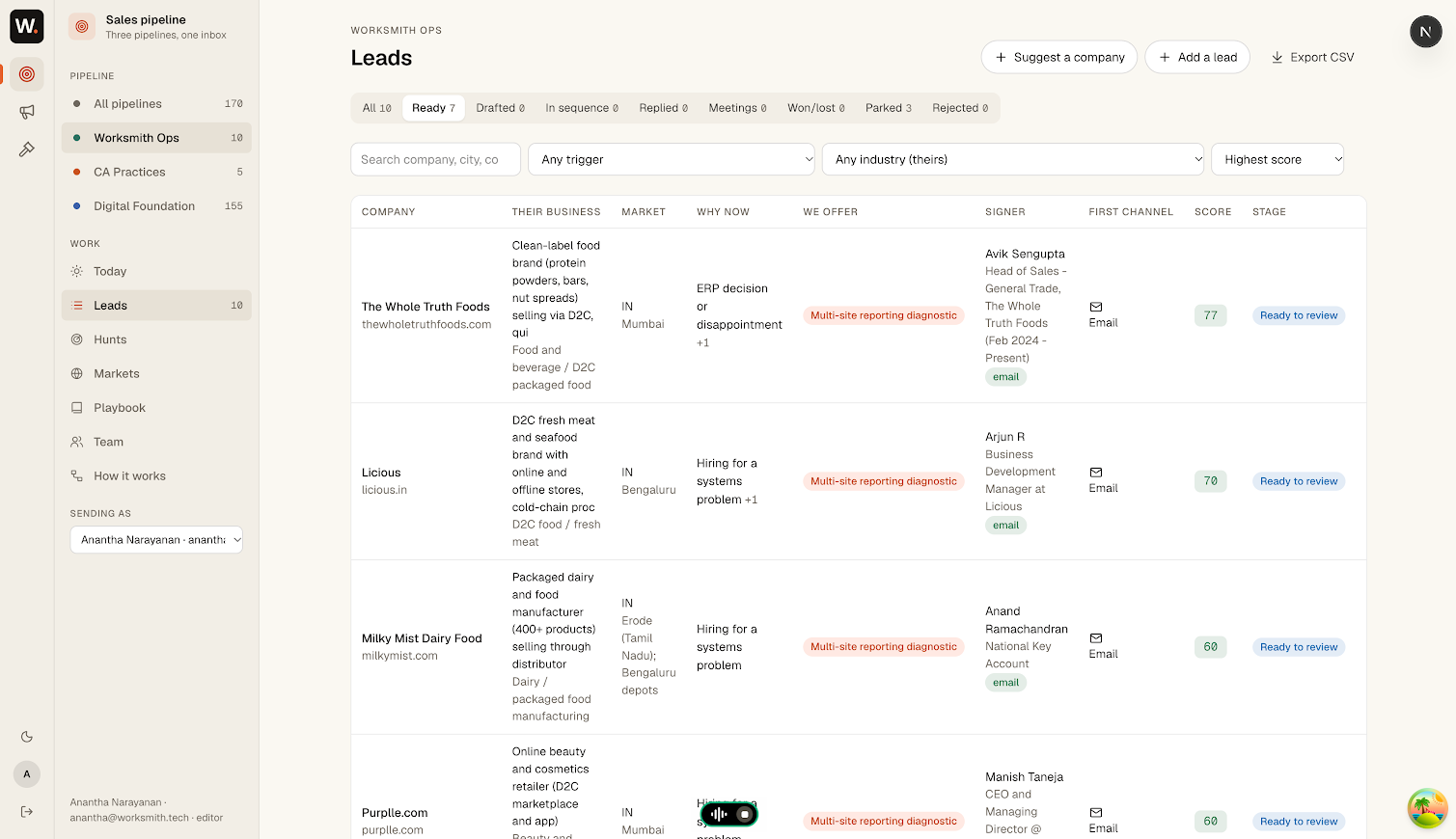
Leads table with pipeline stages, buyer details and reasons to reach out.

The review queue

Review leads in score order. Confirm the ones worth pursuing or mark a lead as a poor fit.
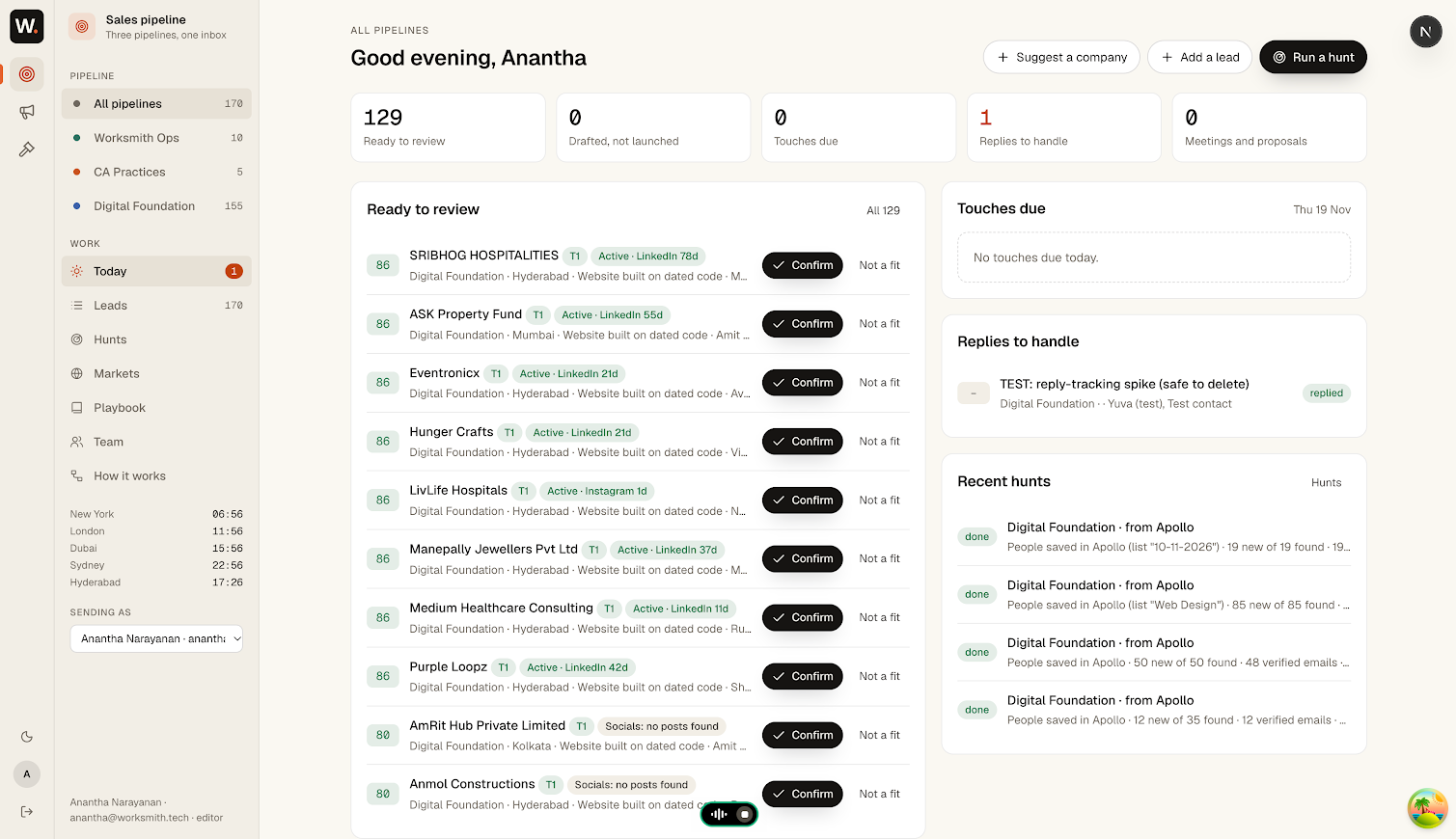
Scored leads with a Confirm and a Not a fit action for each row.

Inside one lead

An example: a mid-sized logistics company opens a new warehouse. For each step, you see what lands on your screen and what happens behind the scenes.

  • On your screen
  • Behind the scenes
  1. Spots the signal

    Supplier enquiry form · RFQ

    “Please quote for fitting out our new Pune warehouse, opening in March.”

    Behind the scenes

    1. Enquiry forms
    2. New site found
    • Collects quote requests from the channels you choose
    • Saves the exact quote and its link with the lead
  2. Checks the fit

    Example Logistics

    Industry
    Logistics
    Size
    Mid-sized
    Region
    In your market

    Behind the scenes

    • Sells in your regionsYes
    • Size you serveYes
    • Already a customerNo

    Fits your buyer profile. Graded A.

    You describe your best customers once, in our first meetings.

  3. Finds the person who signs

    Head of operations

    Example Logistics, Pune

    Behind the scenes

    1. Company data
    2. Decision maker
    • Looks for the role that buys, not just any name
    • Business contacts only, at the company’s own domain
  4. Checks the email before anyone uses it

    ops.head@example.comVerified

    Behind the scenes

    • Matches the company’s domainYes
    • Mailbox existsYes
    • On your do-not-contact listNo

    Safe to draft.

    If it can’t be verified

    The lead is parked with the reason. Nothing is ever sent to a guessed address. See branch A

  5. Drafts a message that quotes the signal

    From
    you@yourcompany.example
    Subject
    Your new Pune warehouse

    Saw you’re opening in Pune this March. We fit out sites like it, and could share how the last one went. Worth a short call?

    Behind the scenes

    • Written in your tone, from examples you approve
    • Mentions only what the source says
    • An opt-out line in every email
  6. Waits for your team’s OK

    Your team can approve and send, edit, or park the lead.

    Behind the scenes

    1. Draft ready
    2. Your team

    Nothing is sent until someone approves it.

    Edits are kept, so later drafts sound more like you.

  7. Sends from your own inbox

    Sent from you@yourcompany.example

    Follow-up drafted for Friday, if there’s no reply

    Behind the scenes

    1. Your inbox
    2. Buyer
    • Your domain, your name, your reputation
    • Sent at a steady pace, never in bulk blasts
  8. Reads the reply and stops the follow-up

    Head of operations, Example LogisticsThanks for writing. Can we talk next week?

    Behind the scenes

    1. Reply found in the same thread
    2. Friday’s follow-up is cancelled
    3. Lead moves to Replied for your team
  9. From a quote request to a meeting, with one decision from your team. See what your team sees

When a lead goes differently

Most leads don’t end in a reply. The platform follows rules you set for each case. Three common ones:

Branch A: The email can’t be checked

  1. No checked email for the buyer
  2. Tries the next data source
  3. Verified now?
    1. Yes
    2. Back in the queue
    3. Drafted as usual
    1. No
    2. Parked with the reason
    3. Your team can add one
  4. Nothing is ever sent to a guessed address.

Branch B: No reply

  1. First email, no answer
  2. Follow-up drafted, waits for approval
  3. Reply by then?
    1. Yes
    2. Follow-ups stop
    3. Lead goes to your team
    1. No
    2. The last follow-up you allow
    3. Then it stops
  4. The lead rests. A new signal brings it back.

Branch C: They ask not to be contacted

  1. “Please take me off your list.”
  2. Read as an opt-out, follow-ups stop at once
  3. Added to your do-not-contact list
  4. Same company later?
    1. This person
    2. Never contacted again
    1. A colleague
    2. Only with a new reason and your OK
  5. Opt-outs hold across every campaign.

Where buying signals show up

Each kind of signal says something different about a buyer. We pick the ones that fit your market with you.

SignalWhat it tells youWhere we look
New site or branchThey’re fitting out, and buyingNews, company sites, filings
Quote requestThe buyer describes what they need and whenSales inbox, supplier enquiry forms
Tender publishedThe spec is already writtenGovernment and private tender portals
New registrationA new business needs everythingCompany and licence registries
Renewal dueThey re-buy on a known datePublic certificate and licence lists
Referral partner B2CThey send customers your wayMaps listings and business directories

What your team sees

One screen each morning: the leads ready for review, each with its source, its contact and its draft. Approve, edit or park in a click.

Ready for review
Found
Found today
Grade
Fit A

Example Logistics, new Pune warehouse

Signal
Requested a quote for the Pune fit-out
Source
Supplier enquiry form
Contact
Head of operations
Email
Verified
Draft
Your new Pune warehouse
Follow-up
One, after three days, if you approve
Approve and send Edit draft Park

Ready for reviewToday

  1. AExample LogisticsNew warehouse, Pune
  2. AExample FoodsRequested a line upgrade
  3. BExample ClinicsNew branch registered
  4. BExample BuildersTender published

RepliesThis week

  • Example Foods: asked for a call on Monday
  • Example Traders: not now, try again in March
  • Example Hotels: opted out, never contacted again

Your stack, your choice

We choose and integrate the tools that best fit your business and line of work. We consider where your buyers enquire, which tools you already use and what fits your budget.

Find
  • Google Maps
  • Enquiry forms
  • Apollo
  • Tender portals
Enrich
  • Apollo
  • Hunter
  • Prospeo
Classify
Worksmith’s in-house lead classification system

We check the company and the evidence of a buying need. Genuine leads move to verification, unclear cases go to review, and invalid records are filtered out.

Verify
  • ZeroBounce
  • MillionVerifier
  • NeverBounce
Write
  • Claude
  • GPT
  • Gemini
Send
  • Gmail
  • Outlook
Track
  • HubSpot
  • Zoho
  • Google Sheets

One example setup. Tools are named as options, not partners.

How we build it for you

Set up around your buyers, your signals and your tools, from the first conversation to your team running it.

Six phases: discovery, signals, connect, sample hunt, handover, live; then keep tuning by looping back to signals. Keep tuning 1 2 3 4 5 6 Discover Signals Connect Sample Handover Live
  1. Learn who you sell to

    Your best customers, and what was happening when they bought.

    Hard part we handle
    Turning “a good customer” into something a search can find
  2. Choose the signals

    Which enquiries and buying milestones matter in your market.

    Hard part we handle
    Checking every source is one we’re allowed to use
  3. Connect your tools

    Your inbox, the tools that suit you, and your deal tracker.

    Hard part we handle
    Keeping your domain’s sending reputation healthy
  4. Run a sample hunt

    Real leads for your market, judged together.

    Hard part we handle
    Cutting the leads that look right but aren’t
  5. Hand it to your team

    Your team signs in and runs the morning list.

    Hard part we handle
    Making review quick enough to keep up
  6. Live, and keep tuning

    We tune signals and drafts from your replies.

    Hard part we handle
    Keeping it sharp as your market changes

Clean by design

These rules apply to every lead, whatever else you set up.

Every lead ends in one of three ways
Buyer enquiry
Source, fit and email checked
  • Sentonly after your team approves it
  • Parkedwith the reason, for your team to see
  • Droppedif they opted out, for good
  • A documented reason for every lead

    The quote and its link are saved with the lead.

  • Checked emails only

    Verified business addresses, never a guess.

  • A person approves every send

    The platform drafts; your team decides.

  • From your own inbox

    Your name, at a steady pace.

  • Opt-outs are final

    One request stops all contact.

  • No cold calls or cold WhatsApp

    WhatsApp only if they wrote first.

Questions you’ll ask

Who sends the emails?

Your team, from your own inbox. The platform finds, checks and drafts; nothing goes out until a person approves it.

Where does it run?

We host it and your team signs in. Your leads and data stay yours. We go through the details on a call.

Is this just cold spam?

No. Every lead has a documented reason, a checked business email and a person’s approval. Messages go out at a steady pace, and opt-outs are honoured everywhere.

What about our B2C side?

The platform finds the businesses that send you customers, such as clinics, shops or consultants near your stores, so you can build those partnerships. It never cold-contacts consumers.

Which tools do we need?

Only the ones that suit you. We start from what you already pay for and suggest the rest, and you can change them later.

Can we try it before committing?

Yes. The sample hunt shows real leads for your market before your team takes it over.

Tell us who you sell to

Write to us and we’ll set up a short meeting to go through your buyers and the signals we’d watch for them.